
· Ease Solutions · atlassian · 4 min read
How Do I Get the Most Out of Jira Service Management’s Alerting and On-Call Features?
In today’s always-on environment, service teams cannot afford to miss critical alerts. System outages, performance degradation, and security incidents demand fast, coordinated response.
With the Atlassian Service Collection on Atlassian Cloud, service leaders gain a connected platform that brings alerting, on-call, and incident management together. Jira Service Management (JSM) plays a central role by turning operational signals into structured, actionable workflows.
This guide explains how service managers and leaders can get value from JSM alerting and on-call, and where expert guidance helps teams move faster and with confidence.
1. Enable Alerts and On-Call Schedules in Your Jira Service Management Project
If you already use Jira Service Management for IT support, HR services, or customer-facing operations, enabling Alerts and On-Call Schedules is the first step.
Once activated, these capabilities are available across all JSM project types, not only ITSM. This allows organizations to extend operational awareness beyond traditional ITSM teams.
After enabling, your project becomes a centralized operations hub where teams can view:
Real-time alerts from connected monitoring tools
On-call schedules and rotations
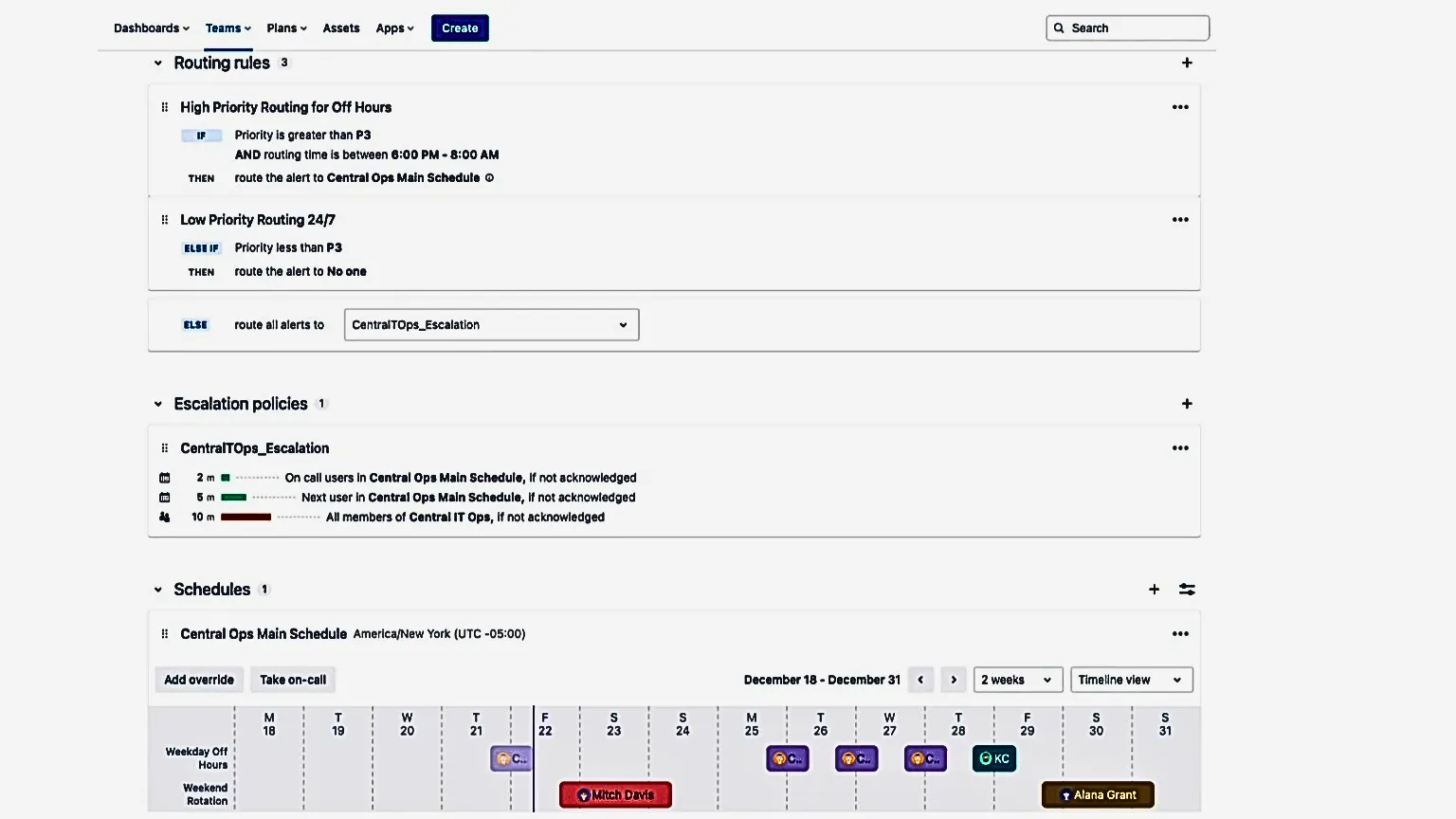
Escalation policies and routing rules
All of this runs directly on Atlassian Cloud, keeping service context, ownership, and collaboration in one place.

2. Build On-Call Schedules That Reflect How Your Teams Work
On-call schedules define responsibility. In Jira Service Management, schedules can be designed to match real operational patterns rather than rigid templates.
Service managers can:
Create daily, weekly, or custom rotations
Support teams working across multiple time zones
Assign schedules to specific services or functional teams
Apply overrides for holidays, absences, or shift swaps
Clear schedules reduce confusion and ensure accountability during incidents. They also help leaders plan coverage for 24/7 services without overloading individuals.
Common on-call scheduling patterns recommended for mid-size and enterprise teams.
3. Configure Alert Notifications That Reach the Right People
Alerting only works when notifications reach the right responders at the right time.
Jira Service Management supports multiple notification channels, including:
Email
Mobile push notifications
SMS
Voice calls
MS Teams
Slack
Notifications can be triggered by specific events such as:
New alert creation
Alert updates
Start or end of an on-call shift
By tailoring notification rules and personal preferences, teams reduce unnecessary interruptions while maintaining reliable coverage for critical events.

4. Centralize Alert Response With Shared Context
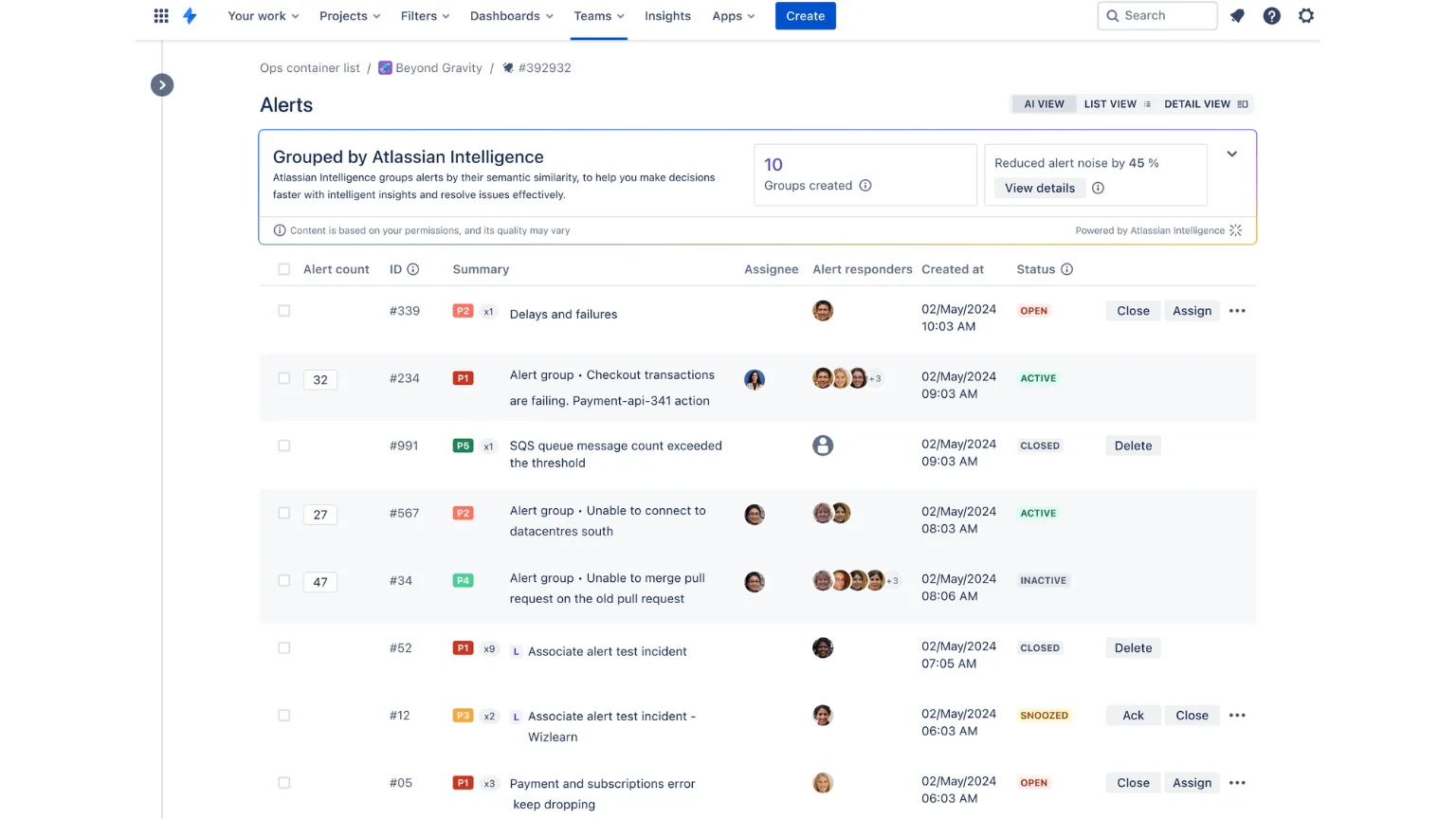
As alerts flow in from monitoring, observability, and delivery tools, Jira Service Management provides a single place to manage and respond.
Key capabilities include:
Alert grouping to reduce duplication and provide context
Linking alerts to incidents for traceability
Built-in intelligence and historical context help teams identify relevant responders or similar past incidents
This centralized approach helps service teams avoid context switching and ensures everyone works with the same, current information inside Atlassian Cloud.
5. Connect Incident Response With Ongoing Improvement
Alerting and on-call are part of a broader incident management lifecycle.
With Jira Service Management, teams can:
Track response actions and ownership
Monitor SLA performance
Document resolution steps and outcomes
Apply automation and runbooks for repeatable scenarios
Because alerts, incidents, and service requests live in the same platform, leaders gain visibility into operational performance and improvement opportunities across teams.
Why This Matters for Service Leaders
Cloud-based services raise expectations across the board:
Faster response times
Better coordination across teams
Clear accountability
Fewer missed or ignored alerts
Jira Service Management, as part of the Atlassian Service Collection, supports these goals by connecting ITSM, operations, and development workflows on Atlassian Cloud.
The result is greater clarity, improved responsiveness, and a service organization that can scale without unnecessary complexity.
Need Help Setting This Up?
While Jira Service Management makes it easier to enable alerting and on-call, designing an effective setup still requires experience.
Organizations often need support with:
Designing on-call and escalation strategies
Aligning alert routing with services and priorities
Integrating monitoring and CI/CD tooling
Reducing alert noise while preserving signal
Embedding incident management practices across teams
This is where Ease Solutions helps.
Our ITIL certifiend consultants work with service leaders to configure Jira Service Management in ways that support real operational needs, not just default settings.
Ready to Strengthen Alerting and On-Call?
If you want to strengthen alerting, on-call, and incident response in Jira Service Management, contact Ease Solutions to accelerate your Atlassian Cloud journey and get measurable results from the Atlassian Service Collection.